


This is Slope 3 unblocked: the full game loads straight from slope3.me in your browser, so you can play Slope 3 online free on a school Chromebook, a laptop or a phone with no download and no sign-up.
What is Slope 3?
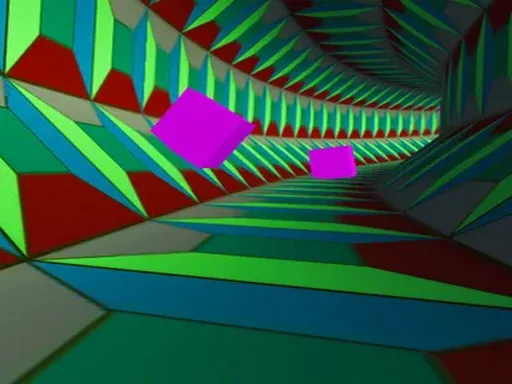
Slope 3 on this site is Slope, the 3D endless runner published on Y8.com. You control a ball rolling down a track that keeps going. You cannot stop it and you cannot slow it down. All you can do is steer left and right to keep it on the course, away from the edges and away from the red blocks. The longer you survive, the faster the ball goes and the higher your score.
A note on the name: the domain is slope3.me, but the game in the player above is the classic Slope. The Unity build loaded here names itself “Slope” and lists Y8 as its company. We would rather tell you that than invent features for a sequel that is not on the page. If you came looking for Slope 3 unblocked, this is the original game that the name comes from, running in your browser with nothing to install.
How to play Slope 3
- Press Play above and wait for the game to load. It is a full 3D build, so the first load takes a few seconds.
- Start a run from the game’s menu. The ball starts rolling at once and does not stop.
- Steer with the left and right arrow keys or A and D. Short taps move the ball a little; holding a key keeps it moving to that side.
- Stay on the track. If the ball rolls off an edge, it falls and the run is over.
- Avoid the red blocks. Touching one ends the run as well.
- Keep going as long as you can. Your score rises the longer you survive, and you start again from the beginning after each crash.
Slope 3 controls
| Action | Keyboard |
|---|---|
| Steer left | Left arrow or A |
| Steer right | Right arrow or D |
| Menus | Mouse click |
| Fullscreen | The fullscreen button under the player |
That is the whole control scheme: there is no jump, no brake and no boost. Y8 lists Slope as playable on touch screens, but we have not confirmed how touch steering works in this build, so a keyboard is the reliable way to play here.
What you will find on the track
- An endless course. There are no levels and no finish line. Each run lasts until the first mistake.
- Rising speed. The ball gets faster the longer the run lasts, so the same turn needs an earlier reaction later on.
- Red blocks. The main obstacle. They sit on the track and one touch ends the run.
- Edges and gaps. The track has no rails. Roll past the side or into a gap and the ball falls.
- Tighter sections. As the run goes on, the track brings sharper turns and narrower paths.
- One score. Distance survived is the only measure, which makes every run a direct try at beating the last one.
Tips for longer runs
- Tap, don’t hold. Holding a key keeps pushing the ball sideways, which is the easiest way to roll off an edge. Short taps give finer control.
- Look further ahead. At high speed you have very little time to react. Watch the track a few sections ahead of the ball, not the ball itself.
- Stay near the middle. From the centre of the track you can move either way. From the edge, a block on your side leaves only one escape.
- Pick a side early. When red blocks appear, decide which gap you are going for as soon as you see them, then make one clean move.
- Expect it to get harder. The start of a run is the slowest part. The runs that last are the ones where you stay calm when the speed picks up.
- Use fullscreen. A bigger view makes the track and the red blocks easier to read at speed.
Playing Slope on a school laptop or Chromebook
The game runs in the browser from this site, so there is nothing to install and nothing to sign in to. It needs a browser with WebGL, which current versions of Chrome, Edge, Firefox and Safari all have. On a slower Chromebook the first load takes longer, and closing other tabs helps the game run smoothly once it starts.
Frequently asked questions about Slope 3
Is Slope 3 unblocked and free to play here?
Yes. The game loads from this site, inside this page, with nothing to download or install and no account to create. Press Play, wait for the build to load, and start a run.
Is this a new Slope 3 or the original Slope?
It is the original Slope. The build that runs here is the Unity version published on Y8, and its own files name it simply “Slope”. slope3.me is the name of this site, not a separate sequel, so you will not find extra features here beyond what Slope itself has.
What are the controls?
Use the left and right arrow keys, or A and D (Q and D on AZERTY), to steer the ball. There is no jump or brake key. Steering is the only control.
What makes you lose?
A run ends when the ball rolls off the edge of the track and falls, or when it hits one of the red blocks. One mistake is enough, so every run starts again from the beginning.
Does Slope get faster?
Yes. The ball picks up speed the longer you survive, and the track brings tighter turns, narrower paths and more red obstacles as the run goes on.
How is the score counted?
Your score grows the longer you stay on the track. There are no lives or levels: the only goal is to go further than your last run.
Who made Slope?
The credits screen inside the game reads "game by @RobKaySF", "music by @SynthR" and "published by @Y8.com". Slope came out on Y8.com in 2014.